📋 概述
擴充功能系統讓外部程序訂閱 Aspose MCP Server 的 Session 變更事件。當 Session 中的文件被修改時,系統會自動將文件快照發送給已綁定的擴充功能程序,開發者可據此實現各種自訂應用。
系統架構
伺服器啟動 → 載入擴展配置 → MCP 就緒
                 ↓
         背景初始化(異步)
                 ↓
         啟動所有擴展程序 → 握手交換元資料
                                    ↓
MCP Client → extension(bind) → ExtensionSessionBridge ←─┘
                                    ↓
Session 變更 → DocumentConversionService → 快照
                                    ↓
                    Extension Process (Node.js/Python/etc.)
                                    ↓
                         接收快照 → 處理 → 回應 ACK
生命週期
- 啟動階段:伺服器啟動時會在背景異步初始化擴展(不阻塞 MCP 伺服器啟動),初始化過程中擴展處於
Initializing狀態 - 初始化中:擴展正在執行握手協議,此時無法綁定 Session,需等待初始化完成
- 運作階段:握手完成後擴展進入
Idle狀態,可透過綁定接收 Session 快照,處理後回應 ACK - 閒置管理:非常駐擴展(idleTimeoutMinutes > 0)在閒置超時後自動關閉
- 常駐模式:設定 idleTimeoutMinutes = 0 的擴展永遠保持運作
💡 適用場景
以下是開發者可透過擴充功能系統實現的應用方向:
預覽與呈現
- 圖片/HTML 預覽 - 將文件快照轉換為圖片或 HTML,整合至編輯器或網頁應用
- 列印服務 - 自動化列印工作流程,支援批次列印或條件觸發列印
安全與合規
- 合規檢查 - 自動檢查文件內容是否符合法規或企業規範(GDPR、HIPAA 等)
- 數位簽章 - 整合數位簽章服務,實現文件電子簽核
- 敏感資料偵測/遮蔽 - 自動偵測並遮蔽個資、信用卡號等敏感資訊
- 審計日誌 - 記錄所有文件變更歷程,符合法規審計要求
協作與整合
- 多人協作狀態廣播 - 透過 WebSocket 廣播文件變更,實現即時協作
- 雲端/ERP/簽核整合 - 自動同步至雲端空間、ERP 系統或簽核流程
- 通知/警報 - 文件變更時發送 Email、Slack、Teams 等通知
智慧處理
- AI 摘要/翻譯 - 整合 LLM 服務,自動生成摘要或翻譯內容
- 文檔對比 - 比較文件版本差異,標示變更內容
- 無障礙輔助 - 文檔朗讀、圖片 OCR 解析,協助視障使用者
自訂處理
- 浮水印/品牌化 - 分發前自動加入浮水印或公司標誌
- 客製化再編輯 - 對文件快照進行自訂轉換或後處理
⚙️ 啟用擴充功能系統
擴充功能系統需要同時啟用 Session 功能。使用以下參數啟用:
快速啟動
# 環境變數
ASPOSE_SESSION_ENABLED=true
ASPOSE_EXTENSION_ENABLED=true
ASPOSE_EXTENSION_CONFIG=/path/to/extensions.json

# 或命令行參數
./AsposeMcpServer --http \
    --session-enabled \
    --extension-enabled \
    --extension-config ./extensions.json
完整的擴充功能參數說明請參考 配置參考 - 擴充功能設定 ,包含所有系統級設定和可覆寫設定(含 Floor/Ceiling 約束)。
📄 擴展配置檔案
擴展配置檔案(extensions.json)定義所有已註冊的擴展。使用物件格式,key 作為擴展的唯一 ID。
完整範例
{
  "extensions": {
    "pdf-viewer": {
      "command": {
        "type": "node",
        "executable": "/path/to/index.js",
        "arguments": "--port 8080",
        "workingDirectory": "/path/to/extension",
        "environment": {
          "NODE_ENV": "production"
        }
      },
      "inputFormats": ["pdf"],
      "supportedDocumentTypes": ["word", "excel", "powerpoint", "pdf"],
      "transportModes": ["mmap", "stdin", "file"],
      "preferredTransportMode": "file",
      "capabilities": {
        "supportsHeartbeat": true,
        "frameIntervalMs": 100
      }
    },
    "cloud-sync": {
      "command": {
        "type": "python",
        "executable": "/path/to/main.py"
      },
      "inputFormats": ["pdf", "html"],
      "supportedDocumentTypes": ["word", "excel"],
      "transportModes": ["file"],
      "preferredTransportMode": "file",
      "capabilities": {
        "supportsHeartbeat": true,
        "idleTimeoutMinutes": 5
      }
    }
  }
}
配置檔使用物件格式(而非陣列),key 即為擴展的唯一 ID(不可包含冒號)。 擴展的名稱、版本等元資料透過握手協議動態交換,無需在配置檔中指定。
欄位說明
| 欄位 | 說明 |
|---|---|
extensions.{id}
|
物件的 key 作為擴展唯一識別符(不可包含冒號) |
command.type
|
命令類型:executable / node / python / dotnet / npx / pipx / custom |
command.executable
|
可執行檔、腳本路徑或套件名稱(npx/pipx 時為套件名稱) |
command.arguments
|
命令列參數 |
command.workingDirectory
|
工作目錄 |
command.environment
|
環境變數(支援 ${VAR} 引用系統環境變數) |
inputFormats
|
接受的輸入格式陣列:pdf / html / png |
supportedDocumentTypes
|
支援的文檔類型:word / excel / powerpoint / pdf |
transportModes
|
支援的傳輸模式陣列:mmap / stdin / file |
preferredTransportMode
|
偏好的傳輸模式 |
capabilities.supportsHeartbeat
|
是否支援心跳檢測 |
capabilities.frameIntervalMs
|
快照傳輸間隔毫秒數(預設:100,範圍:10-5000) |
capabilities.snapshotTtlSeconds
|
未確認快照的 TTL 秒數(預設:30,範圍:5-300) |
capabilities.maxMissedHeartbeats
|
最大連續心跳失敗次數(預設:3,範圍:1-20) |
capabilities.idleTimeoutMinutes
|
閒置卸載超時分鐘數(預設:30,範圍:1-1440,0=常駐模式) |
🤝 握手協議
所有擴展在服務啟動後會在背景異步啟動,並執行初始化握手。透過握手,擴展會回報自己的名稱、版本等元資料。握手期間擴展處於 Initializing 狀態,此時無法進行綁定操作。
握手流程
MCP Server                                    Extension
    │                                              │
    │  1. 啟動擴展程序                              │
    │─────────────────────────────────────────────>│
    │                                              │
    │  2. {"type":"initialize","protocolVersion":"1.0"}
    │─────────────────────────────────────────────>│
    │                                              │
    │  3. {"type":"initialize_response","name":"...","version":"..."}
    │<─────────────────────────────────────────────│
    │                                              │
    │  4. {"type":"initialized"}                   │
    │─────────────────────────────────────────────>│
    │                                              │
    │  握手完成,開始正常運作                        │
握手消息
握手失敗處理
- 握手超時(預設 30 秒):擴展被標記為不可用
- 缺少必填欄位(name 或 version):握手失敗,擴展被標記為不可用
- 擴展程序啟動失敗:擴展被標記為不可用,記錄錯誤原因
🚚 傳輸模式
擴充功能系統支援三種傳輸模式,用於將快照資料發送給擴充功能程序:
📨 消息協議
擴展程序透過標準輸入輸出與 MCP Server 通訊。消息格式為 JSON,每行一條消息。
擴展啟動時必須先完成握手協議(initialize → initialize_response → initialized),才會收到以下消息。
MCP Server → 擴充功能 消息
擴充功能 → MCP Server 消息
🔧 擴充功能工具操作
MCP 客戶端可透過 extension 工具管理擴展和綁定。
list - 列出所有擴展
{
  "operation": "list"
}
bind - 綁定 Session 到擴展
{
  "operation": "bind",
  "sessionId": "abc123",
  "extensionId": "pdf-viewer",
  "format": "pdf"
}
unbind - 解除綁定
{
  "operation": "unbind",
  "sessionId": "abc123",
  "extensionId": "pdf-viewer"
}
status - 查詢擴展狀態
{
  "operation": "status",
  "extensionId": "pdf-viewer"
}
set_format - 設定快照格式
{
  "operation": "set_format",
  "sessionId": "abc123",
  "extensionId": "pdf-viewer",
  "format": "html"
}
bindings - 列出 Session 綁定
{
  "operation": "bindings",
  "sessionId": "abc123"
}
command - 發送命令給擴展
{
  "operation": "command",
  "sessionId": "abc123",
  "extensionId": "pdf-viewer",
  "command": "goto",
  "data": { "page": 5 }
}
💻 開發範例
Node.js 擴展範例
const readline = require('readline');

let initialized = false;

const rl = readline.createInterface({
    input: process.stdin,
    output: process.stdout,
    terminal: false
});

rl.on('line', (line) => {
    try {
        const message = JSON.parse(line);
        const msgType = message.type;

        switch (msgType) {
            // ===== 握手協議 =====
            case 'initialize':
                // 回應握手,提供擴展元資料
                const initResponse = {
                    type: 'initialize_response',
                    name: 'My Extension',
                    version: '1.0.0',
                    title: '我的擴展功能',
                    description: '提供自訂文件處理功能',
                    author: '開發者名稱',
                    websiteUrl: 'https://example.com'
                };
                console.log(JSON.stringify(initResponse));
                console.error('Handshake: sent initialize_response');
                break;

            case 'initialized':
                // 握手完成,開始正常運作
                initialized = true;
                console.error('Handshake completed, ready to receive messages');
                break;

            // ===== 正常運作消息 =====
            case 'snapshot':
                if (!initialized) {
                    console.error('Warning: received snapshot before initialization');
                    return;
                }
                // 處理快照
                console.error(`Received snapshot for session ${message.sessionId}`);
                console.error(`File: ${message.filePath}, Size: ${message.dataSize}`);

                // 驗證 checksum(可選但建議)
                // const data = fs.readFileSync(message.filePath);
                // if (crc32(data) !== message.checksum) { /* 處理錯誤 */ }

                // 發送 ACK
                const ack = {
                    type: 'ack',
                    sessionId: message.sessionId,
                    sequenceNumber: message.sequenceNumber,
                    success: true
                };
                console.log(JSON.stringify(ack));
                break;

            case 'heartbeat':
                // 回應心跳
                const response = {
                    type: 'heartbeat_response',
                    status: 'ok',
                    timestamp: new Date().toISOString()
                };
                console.log(JSON.stringify(response));
                break;

            case 'command':
                // 處理命令
                console.error(`Received command: ${message.commandType}`);
                console.error(`Payload: ${JSON.stringify(message.commandPayload)}`);
                break;

            case 'session_closed':
                // 清理 Session 資源
                console.error(`Session ${message.sessionId} closed`);
                break;

            case 'session_unbound':
                // Session 解除綁定(Session 仍存在,但不再綁定到此擴展)
                console.error(`Session ${message.sessionId} unbound`);
                break;

            case 'shutdown':
                // 準備關閉
                console.error('Shutdown requested');
                process.exit(0);
                break;
        }
    } catch (error) {
        console.error('Error processing message:', error);
    }
});

console.error('Extension started, waiting for handshake...');
Python 擴展範例
import sys
import json
from datetime import datetime

initialized = False

def main():
    global initialized
    print("Extension started, waiting for handshake...", file=sys.stderr)

    for line in sys.stdin:
        try:
            message = json.loads(line.strip())
            msg_type = message.get('type')

            # ===== 握手協議 =====
            if msg_type == 'initialize':
                # 回應握手,提供擴展元資料
                init_response = {
                    'type': 'initialize_response',
                    'name': 'My Extension',
                    'version': '1.0.0',
                    'title': '我的擴展功能',
                    'description': '提供自訂文件處理功能',
                    'author': '開發者名稱',
                    'websiteUrl': 'https://example.com'
                }
                print(json.dumps(init_response))
                sys.stdout.flush()
                print("Handshake: sent initialize_response", file=sys.stderr)

            elif msg_type == 'initialized':
                # 握手完成,開始正常運作
                initialized = True
                print("Handshake completed, ready to receive messages", file=sys.stderr)

            # ===== 正常運作消息 =====
            elif msg_type == 'snapshot':
                if not initialized:
                    print("Warning: received snapshot before initialization", file=sys.stderr)
                    continue
                # 處理快照
                session_id = message['sessionId']
                file_path = message['filePath']
                data_size = message['dataSize']
                seq_num = message['sequenceNumber']
                print(f"Received snapshot: {file_path} ({data_size} bytes)", file=sys.stderr)

                # 驗證 checksum(可選但建議)
                # checksum = message['checksum']
                # with open(file_path, 'rb') as f:
                #     if crc32(f.read()) != checksum: handle_error()

                # 發送 ACK
                ack = {
                    'type': 'ack',
                    'sessionId': session_id,
                    'sequenceNumber': seq_num,
                    'success': True
                }
                print(json.dumps(ack))
                sys.stdout.flush()

            elif msg_type == 'heartbeat':
                # 回應心跳
                response = {
                    'type': 'heartbeat_response',
                    'status': 'ok',
                    'timestamp': datetime.utcnow().isoformat() + 'Z'
                }
                print(json.dumps(response))
                sys.stdout.flush()

            elif msg_type == 'command':
                # 處理命令
                cmd_type = message.get('commandType')
                payload = message.get('commandPayload', {})
                print(f"Received command: {cmd_type}, payload: {payload}", file=sys.stderr)

            elif msg_type == 'session_closed':
                # 清理資源
                print(f"Session {message['sessionId']} closed", file=sys.stderr)

            elif msg_type == 'session_unbound':
                # Session 解除綁定(Session 仍存在,但不再綁定到此擴展)
                print(f"Session {message['sessionId']} unbound", file=sys.stderr)

            elif msg_type == 'shutdown':
                # 準備關閉
                print("Shutdown requested", file=sys.stderr)
                sys.exit(0)

        except json.JSONDecodeError as e:
            print(f"JSON parse error: {e}", file=sys.stderr)
        except Exception as e:
            print(f"Error: {e}", file=sys.stderr)

if __name__ == '__main__':
    main()
🎯 實際範例:aspose-mcp-preview
aspose-mcp-preview 是一個完整的擴充功能實作範例,提供即時文檔預覽功能。透過 WebSocket 即時更新,讓 MCP 客戶端在編輯文檔時可同步在瀏覽器中查看 PNG、HTML 或 PDF 預覽。
功能展示
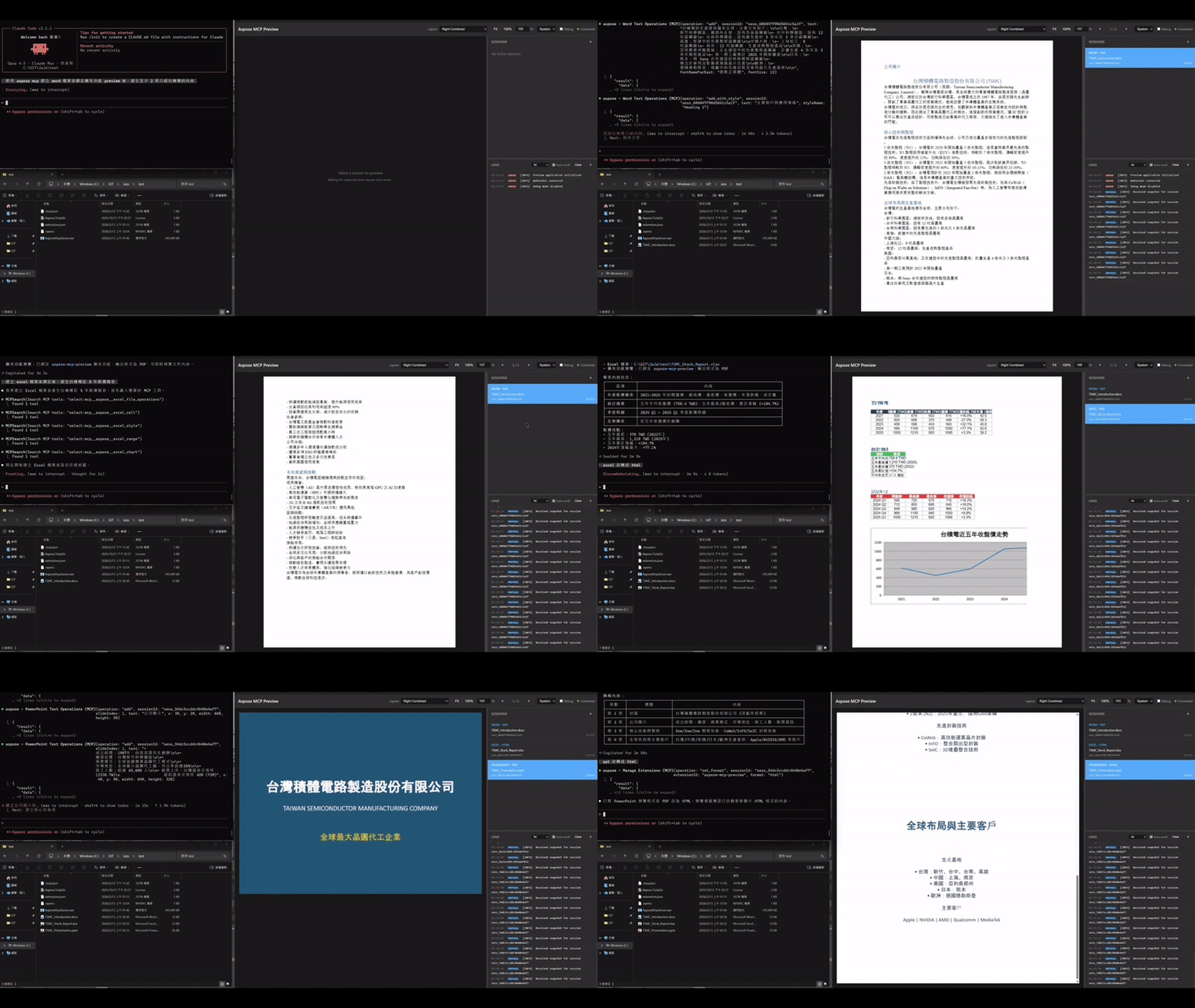
主要功能
- 即時預覽 - 透過 WebSocket 即時更新,文檔變更立即反映在預覽畫面
- 多格式支援 - 支援 Word、Excel、PowerPoint、PDF 文檔類型
- 多種輸出格式 - 可輸出為 PNG、HTML、PDF 格式
- 多 Session 管理 - 支援多個 Session 同時預覽,可快速切換
- 縮放控制 - 自適應、100%、自訂百分比等縮放選項
- PDF 頁面導覽 - PDF 文檔支援頁面切換導覽
- 主題切換 - 支援亮色、暗色、跟隨系統主題
- 除錯日誌 - 可收合的日誌面板,方便開發除錯
快速安裝
在 extensions.json 中加入以下配置:
{
  "extensions": {
    "preview": {
      "command": {
        "type": "npx",
        "executable": "aspose-mcp-preview",
        "arguments": "--port 3000"
      },
      "inputFormats": ["png", "html", "pdf"],
      "supportedDocumentTypes": ["word", "excel", "powerpoint", "pdf"],
      "transportModes": ["stdin", "file", "mmap"],
      "preferredTransportMode": "stdin",
      "capabilities": {
        "supportsHeartbeat": true,
        "idleTimeoutMinutes": 0
      }
    }
  }
}
命令列選項
| 選項 | 預設值 | 說明 |
|---|---|---|
--port
|
3000 | Web 伺服器連接埠 |
--host
|
localhost | Web 伺服器主機名稱 |
--no-open
|
false | 啟動時不自動開啟瀏覽器 |
--transport
|
stdin | 傳輸模式:stdin / file / mmap |
完整文檔、原始碼與更新請參考 GitHub - aspose-mcp-preview
📝 最佳實踐
握手協議
- 擴展必須在收到
initialize後盡快回應initialize_response name和version欄位為必填,建議版本號使用 semver 格式- 在收到
initialized之前不要處理其他消息 - 握手超時預設為 30 秒,請確保擴展能在此時間內完成初始化
錯誤處理
- 使用 stderr 輸出日誌和錯誤,stdout 僅用於協議消息
- 處理 JSON 解析錯誤,避免擴展崩潰
- 設定適當的超時處理,避免阻塞
效能優化
- 優先使用 stdin 傳輸模式(預設),跨平台且無磁碟 I/O 開銷
- 需要最佳效能時可使用 mmap 模式(Windows/Linux 零拷貝)
- 及時發送 ACK 確認,避免重試
- 設定合理的 frameIntervalMs 配合擴展處理能力
可靠性
- 啟用 supportsHeartbeat 保持連接活躍
- 發送 ACK 確認快照送達,避免重複發送
- 處理 session_closed 消息正確釋放資源
🔗 相關資源
- aspose-mcp-preview - 即時文檔預覽擴充功能(完整實作範例)
- 擴充功能工具操作文檔
- 部署指南 - 擴充功能配置
- 功能特性 - 擴充功能系統
-
extensions_example.json- 完整配置範例